Web Design
Moodboard feature section
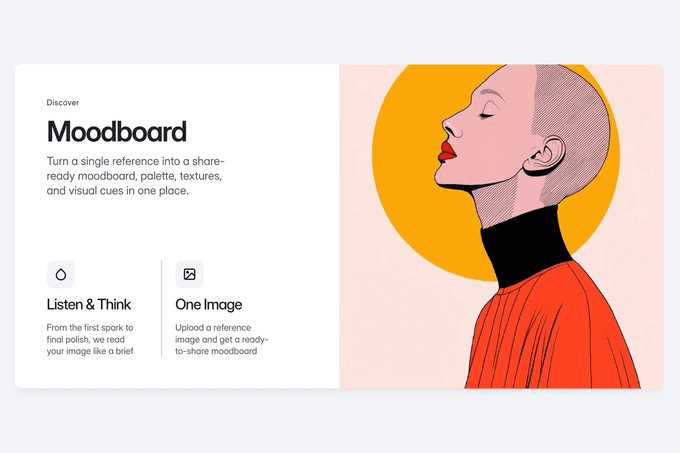
A clean product website section featuring a bold, minimalist illustration of a profile alongside structured text explaining the "Moodboard" and "Listen & Think" features.
About
A section exploration for a SaaS Framer template — specifically a feature section presenting "Moodboard" and "Listen & Think" as product capabilities. Clean layout, structured copy hierarchy, and a bold minimalist illustration of a profile as the visual anchor.
Most SaaS feature sections default to a UI screenshot: show the interface, label the parts, explain what it does. This one doesn't. The illustration carries the section instead — a human face for a human-facing product.
What I Find Inspiring About This
The illustration earns its place because of what it represents, not just what it looks like. A moodboard feature is fundamentally about taste, curation, the way a person sees. A profile — someone looking, thinking, attending — communicates that better than any UI panel could. The conceptual connection is clean and the visual is striking at the size feature sections live at.
The layout does something specific with its restraint. Two features, two short text blocks, one illustration. Nothing is competing. The hierarchy is immediate: illustration draws the eye, heading names the feature, copy explains it. You don't have to work to read the section — it reads itself in the right order.
What makes this worth studying as a template pattern is how transferable it is. Illustration instead of screenshot is a higher-risk, higher-reward choice on a SaaS site — it requires the illustration to do conceptual work, not just decorative work. When it connects to the product idea as directly as this one does, it consistently outperforms a UI grab in terms of how long someone stays on the section.